Shopify SEO Guide: How to Optimize Your Store for Google in 2026
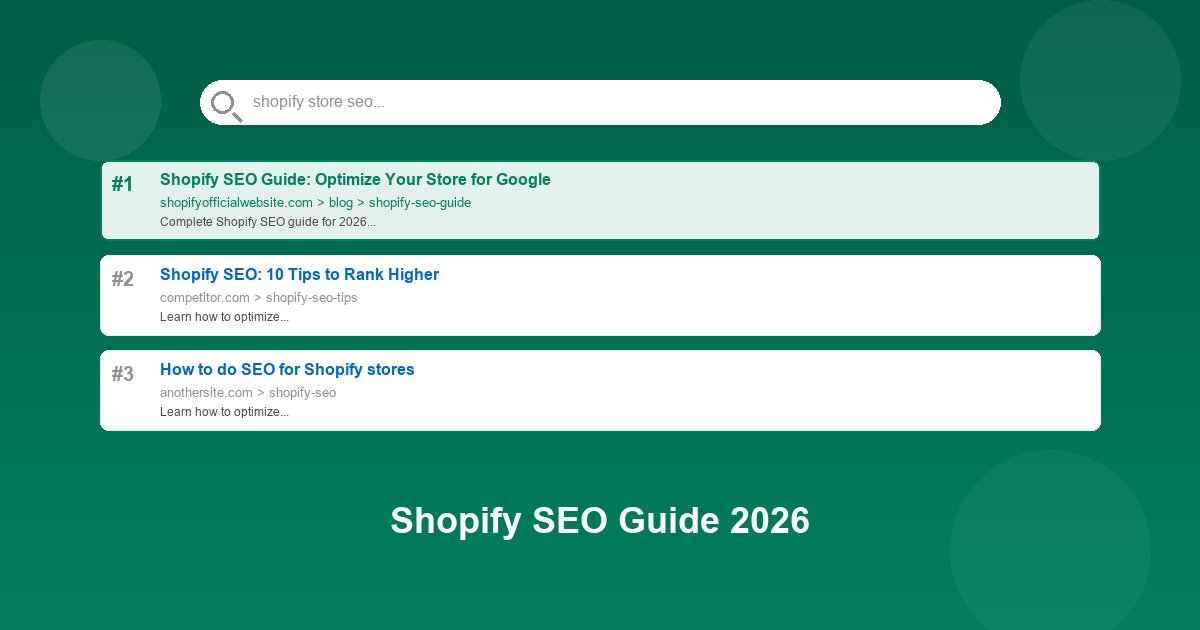
Table of Contents
- Why Shopify SEO Matters in 2026
- How Shopify Handles SEO Automatically
- Keyword Research for Your Shopify Store
- Optimizing Product Pages for SEO
- Optimizing Collection Pages
- Blog Content Strategy for SEO
- Technical SEO: Speed, Mobile, and Structure
- Building Backlinks to Your Shopify Store
- Measuring and Tracking SEO Success
Search engine optimization (SEO) is the single most cost-effective way to drive consistent, free traffic to your Shopify store. Unlike paid ads that stop the moment you stop paying, SEO compounds over time — a well-optimized product page can generate sales for years after you publish it.
In this comprehensive guide, you'll learn exactly how to optimize your Shopify store for Google in 2026. We'll cover everything from keyword research and on-page optimization to technical SEO and link building — all specifically tailored for Shopify stores.
Why Shopify SEO Matters in 2026
Ecommerce search is booming. Over 55% of all product searches now start on Google, not Amazon. That means if your Shopify store isn't showing up in Google's search results, you're leaving money on the table — every single day.
Here's why SEO is especially critical for Shopify store owners in 2026:
- Organic traffic is free: Once you rank, you don't pay per click like you do with Google Ads or Facebook Ads.
- Higher intent than social: People searching Google are actively looking to buy. Social media browsers are just scrolling.
- Long-term ROI: A product page that ranks #3 for a buying keyword can generate sales for years with minimal maintenance.
- Trust and credibility: Users trust organic results more than ads. Appearing at the top of Google signals authority.
- Compounding effect: As you build more content and backlinks, your entire domain gets stronger, making it easier to rank new pages.
How Shopify Handles SEO Automatically
Shopify is actually quite good for SEO out of the box. The platform handles several critical SEO elements automatically, which gives you a head start compared to custom-built stores.
What Shopify does for you automatically:
- Canonical tags: Shopify automatically adds canonical tags to prevent duplicate content issues from product variants and collection filters.
- Sitemap.xml: A XML sitemap is auto-generated at
yoursite.com/sitemap.xmland updated whenever you add products or pages. - robots.txt: Shopify's default robots.txt blocks non-essential pages (like cart, checkout, and search results) from being indexed.
- Mobile-responsive themes: All official Shopify themes are mobile-friendly, which is critical since Google uses mobile-first indexing.
- SSL certificate: Every Shopify store gets HTTPS by default — a confirmed Google ranking factor.
- Structured data: Shopify themes include product schema markup (price, availability, reviews) automatically.
- Fast CDN: Shopify's global CDN ensures your store loads quickly worldwide.
However, Shopify's automatic SEO is just the foundation. To actually rank and drive traffic, you need to put in the work on the elements Shopify can't handle for you.
Keyword Research for Your Shopify Store
Keyword research is the foundation of all SEO. If you optimize for the wrong keywords, nothing else matters. The goal is to find keywords that your potential customers are searching for — and that you have a realistic chance of ranking for.
Types of keywords to target:
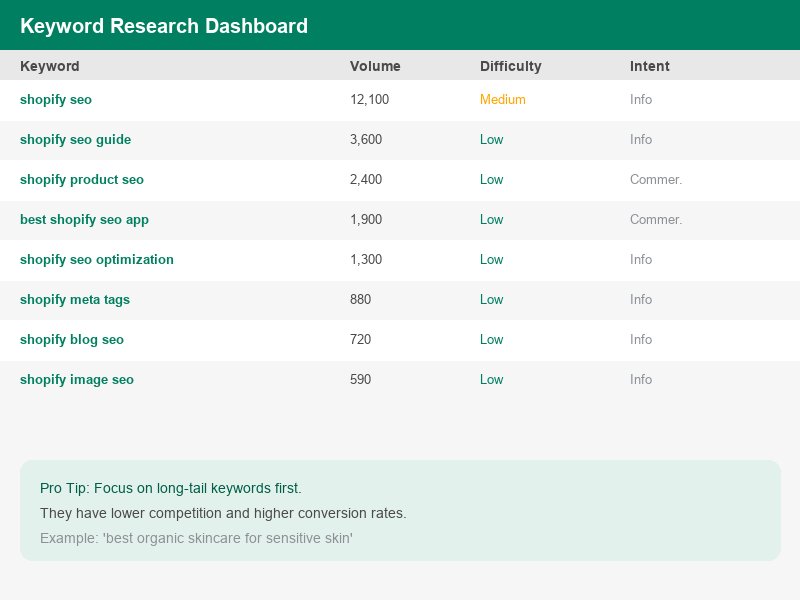
- Product keywords: "men's leather wallet", "wireless gaming mouse", "organic face serum" — these are direct buying searches.
- Long-tail keywords: "best leather wallet for men under $50" — lower search volume but higher conversion rate and easier to rank.
- Informational keywords: "how to choose a leather wallet" — great for blog content that attracts top-of-funnel traffic.
- Brand keywords: "Nike running shoes" — if you sell the brand, these are high-intent searches.
- Comparison keywords: "leather vs canvas wallet" — perfect for blog posts that subtly recommend your products.
How to find keywords for your Shopify store:
- Google Autocomplete: Type your product into Google and see what suggestions appear. These are real searches.
- Google Related Searches: Scroll to the bottom of any Google results page for related search terms.
- Free tools: Use Google Keyword Planner (free with a Google Ads account), Ubersuggest, or AnswerThePublic to find search volumes and ideas.
- Paid tools: Ahrefs, SEMrush, and Moz give you search volume, keyword difficulty scores, and competitor analysis.
- Competitor analysis: Enter a competitor's URL into any keyword tool to see what keywords they rank for.
- Google Search Console: Once your store has some traffic, check Search Console to see which queries already bring you visitors — then optimize those pages further.
Optimizing Product Pages for SEO
Your product pages are your money pages. They're where visitors become customers, so they deserve the most SEO attention. Here's how to optimize every element of a Shopify product page for Google.
1. Product Title (H1 + Title Tag)
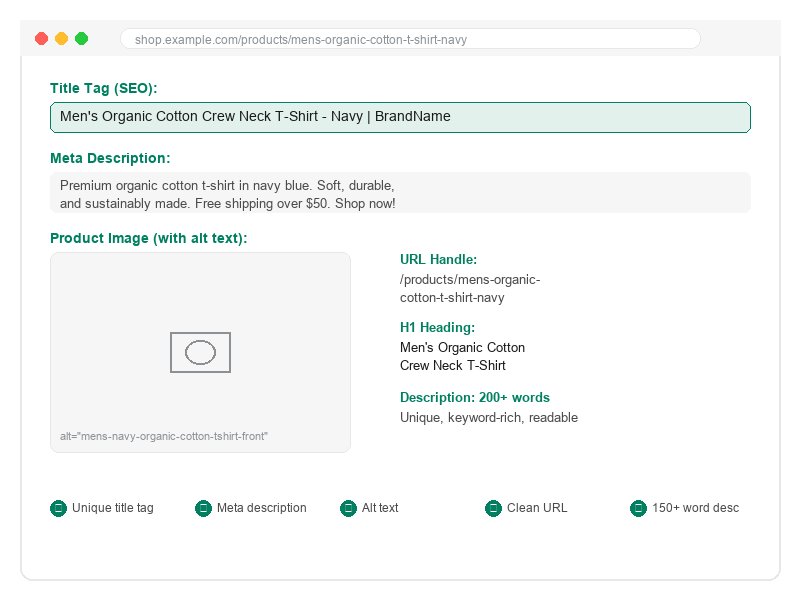
Your product title serves as both the visible H1 on the page and the title tag in search results (unless you customize the title tag separately). Make it descriptive and keyword-rich:
- Bad: "T-Shirt — Blue"
- Good: "Men's Organic Cotton Crew Neck T-Shirt — Navy Blue"
- Best: "Men's Organic Cotton Crew Neck T-Shirt — Navy Blue | [Brand Name]"
In Shopify, you can set a custom SEO title by scrolling to the bottom of the product editor and clicking "Edit website SEO".
2. Meta Description
The meta description doesn't directly affect rankings, but it dramatically affects click-through rate (CTR) from search results. A compelling meta description can increase your traffic even if your ranking stays the same.
- Keep it under 155 characters
- Include your primary keyword
- Add a call to action: "Shop now", "Free shipping", "Limited stock"
- Include a unique selling point: "100% organic cotton", "Handmade in USA"
3. Product Description
Your product description is the most important on-page content for SEO. Unfortunately, many store owners just copy the manufacturer's description — which Google sees as duplicate content and may penalize.
How to write SEO-friendly product descriptions:
- Write unique descriptions for every product (never copy manufacturer text verbatim)
- Aim for 150–300 words — long enough to include keywords naturally, short enough to keep shoppers engaged
- Use your primary keyword in the first 100 words
- Include 3–5 related/LSI keywords naturally (e.g., for "leather wallet": "genuine leather", "bifold", "cardholder", "minimalist")
- Use bullet points for features — Google loves structured content
- Include dimensions, materials, care instructions — these answer common search queries
- Write for humans first, Google second. Readability matters.
4. Product URL Handle
Shopify generates URLs from your product title, but you can customize them. Keep URLs short, descriptive, and keyword-rich:
- Bad:
/products/tee-navy-m - Good:
/products/mens-organic-cotton-t-shirt-navy
To edit a URL handle in Shopify: Edit product → scroll to bottom → "Edit website SEO" → modify URL handle.
5. Product Images
Images can drive significant traffic through Google Image Search and also improve your page's overall SEO.
- File names: Rename images before uploading — "mens-navy-cotton-tshirt-front.jpg" not "IMG_2847.jpg"
- Alt text: Add descriptive alt text to every product image. This helps Google understand the image and improves accessibility.
- Image size: Compress images to under 200KB. Use Shopify's built-in image optimizer or tools like TinyPNG.
- Image format: Use WebP format for smaller file sizes without quality loss.
Key insight: Products with 3+ images and detailed descriptions convert 38% better than products with a single image and short description. SEO and conversion optimization go hand in hand.
Optimizing Collection Pages
Collection pages (what Shopify calls category pages) are often overlooked in SEO, but they can be powerful traffic drivers. A well-optimized collection page can rank for broader, higher-volume keywords than individual product pages.
How to optimize Shopify collection pages:
- Collection title: Use descriptive, keyword-rich names: "Men's Leather Wallets" not just "Wallets"
- Collection description: Add 100–200 words of unique content at the top or bottom of the collection page. This gives Google text to understand and rank the page.
- Custom meta title and description: Edit these in the collection editor's "Edit website SEO" section.
- URL handle: Keep it clean:
/collections/mens-leather-wallets - Internal linking: Link to your collections from your homepage, blog posts, and other collection pages.
Blog Content Strategy for SEO
A blog is one of the most powerful SEO tools for a Shopify store. While product pages target buying keywords, blog posts target informational keywords that attract people earlier in the buying journey — then guide them toward your products.
Why blogging works for ecommerce SEO:
- Blog posts can rank for hundreds of long-tail keywords that product pages can't
- Each blog post is an opportunity to internally link to your products
- Blog content gets shared on social media, which can lead to backlinks
- Google rewards websites that consistently publish fresh, high-quality content
- Blog posts answer customer questions, reducing support tickets
Content ideas for a Shopify blog:
- How-to guides: "How to style a leather jacket" (if you sell jackets)
- Buying guides: "How to choose the right running shoes for your foot type"
- Comparison posts: "Organic vs conventional cotton: which is better?"
- List posts: "10 essential items for your home gym"
- Trend posts: "2026 fashion trends: what's hot this season"
- Customer stories: "How [customer name] grew their business using our products"
Publishing frequency: Aim for 2–4 blog posts per month. Consistency matters more than volume. Each post should be at least 1,000 words and thoroughly answer the searcher's question.
For a complete traffic strategy, read our guide on driving traffic to your Shopify store, which covers SEO alongside social media, email marketing, and paid ads.
Technical SEO: Speed, Mobile, and Structure
Technical SEO is about making sure Google can crawl, understand, and serve your pages efficiently. Shopify handles much of this for you, but there are several optimizations you should make.
1. Page Speed
Google uses Core Web Vitals as a ranking factor. A slow store doesn't just rank lower — it also converts worse. Every 1-second delay in page load time reduces conversions by 7%.
- Compress images: Use WebP format and keep images under 200KB
- Limit apps: Each Shopify app adds JavaScript that slows your store. Only install apps you actively use.
- Choose a fast theme: Shopify's Dawn theme is built for speed. Other performance-optimized themes include Sense, Refresh, and Spotlight.
- Lazy load images: Most modern Shopify themes do this automatically, but verify in your theme settings.
- Minify CSS/JS: Use Shopify apps like Minify or Booster to compress your code.
- Test your speed: Use Google PageSpeed Insights or GTmetrix regularly. Aim for a score of 80+ on mobile.
2. Mobile Optimization
Google uses mobile-first indexing, meaning it crawls and ranks the mobile version of your site first. If your mobile experience is poor, your rankings will suffer across the board.
- Use a responsive Shopify theme (all official themes are responsive)
- Test your store on multiple mobile devices and screen sizes
- Ensure tap targets (buttons, links) are large enough for mobile users
- Check that text is readable without zooming on mobile
- Avoid pop-ups that cover the screen on mobile — Google penalizes intrusive interstitials
3. Site Structure and Navigation
A clear site structure helps Google understand your store and ensures all your pages get crawled and indexed.
- Keep your site shallow: every page should be reachable within 3 clicks from the homepage
- Use descriptive navigation menus with your main collections
- Create an HTML sitemap page (different from XML sitemap) for users
- Use breadcrumbs on product and collection pages
- Fix broken links — use Google Search Console to find 404 errors and add 301 redirects
4. Submit Your Sitemap to Google
Shopify automatically generates a sitemap at yoursite.com/sitemap.xml. Submit this to Google Search Console so Google knows about all your pages:
- Sign up for Google Search Console (free)
- Verify your domain ownership
- Go to "Sitemaps" and submit
sitemap.xml - Check back in a few days to see how many pages Google has indexed
Building Backlinks to Your Shopify Store
Backlinks — links from other websites to yours — remain one of Google's top ranking factors. Think of each backlink as a "vote of confidence" for your store. But not all backlinks are equal; quality matters far more than quantity.
How to build backlinks for your Shopify store:
- Create linkable assets: Publish in-depth guides, original research, or infographics that other sites naturally want to reference.
- Reach out to bloggers: Find blogs in your niche and offer to write a guest post or provide a product for review.
- Get listed in directories: Submit your store to relevant business directories and industry-specific listing sites.
- HARO (Help a Reporter Out): Sign up as a source and get quoted in news articles with a link back to your store.
- Partner with complementary brands: Cross-promote with non-competing brands in your niche.
- Create a affiliate program: Affiliates who link to your products create natural backlinks.
- Press coverage: Send press releases about new product launches or company milestones.
- Social media profiles: Ensure your social profiles link to your store — these are easy backlinks.
Warning: Avoid buying backlinks or using link farms. Google's algorithms are sophisticated enough to detect unnatural link patterns, and the penalty can devastate your rankings. Focus on earning genuine, high-quality links.
Measuring and Tracking SEO Success
SEO is not a "set it and forget it" strategy. You need to track your progress, identify what's working, and double down on successful tactics. Here are the key metrics and tools to monitor.
Key SEO Metrics to Track:
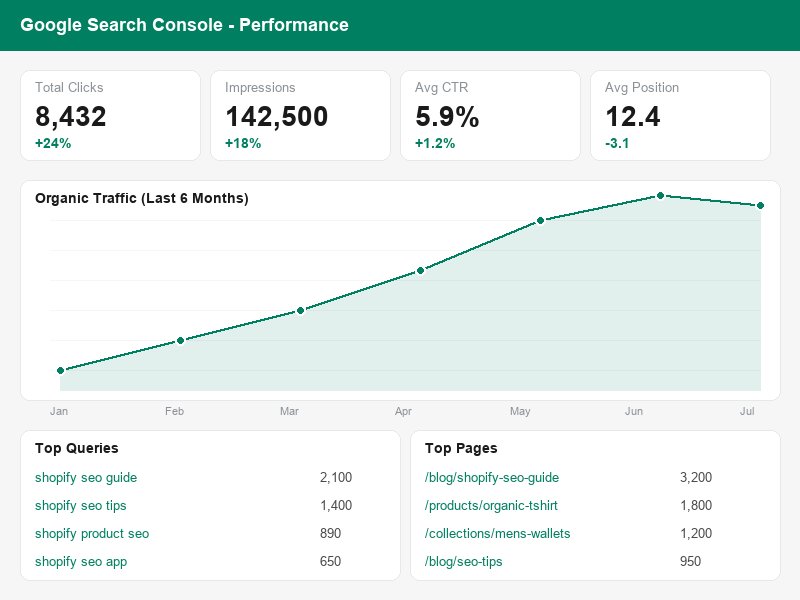
- Organic traffic: The number of visitors coming from Google search results. This is your bottom-line SEO metric.
- Keyword rankings: Track where your pages rank for your target keywords. Use tools like Ahrefs, SEMrush, or Google Search Console.
- Click-through rate (CTR): What percentage of people who see your result actually click on it? Low CTR means your title/meta description needs improvement.
- Indexed pages: How many of your pages are in Google's index? If this number drops, something is wrong.
- Core Web Vitals: Monitor your page speed scores and fix any issues that arise.
- Backlink profile: Track the number and quality of sites linking to you. Monitor for lost links and new links.
- Organic conversion rate: Are your SEO visitors actually buying? Track conversions in Google Analytics.
Essential SEO Tools for Shopify:
- Google Search Console (free): The most important tool. Shows which queries bring you traffic, your average rankings, indexed pages, and technical issues.
- Google Analytics 4 (free): Tracks traffic, user behavior, and conversions. Connect it to your Shopify store.
- Google PageSpeed Insights (free): Tests your page speed and gives specific optimization recommendations.
- Ahrefs Webmaster Tools (free tier): Shows your backlinks, referring domains, and organic keywords.
- Shopify Analyzer (free): Shopify's built-in tool that checks your store's SEO health.
Start Your Shopify Store Today
Build an SEO-optimized store with Shopify's fast, mobile-friendly themes. 3 days free, no credit card required.
Start Free Trial Now